Your SEO agent audits on a schedule. You ship the fixes from your IDE.
A practical AI SEO tool for solo technical founders. The agent audits your pages on a schedule against your real Search Console data, mines keyword demand, and writes typed recommendations. You pull them into Cursor or Claude Code through MCP, and your own coding agent applies the included prompt. Five minutes a day, no spreadsheets.
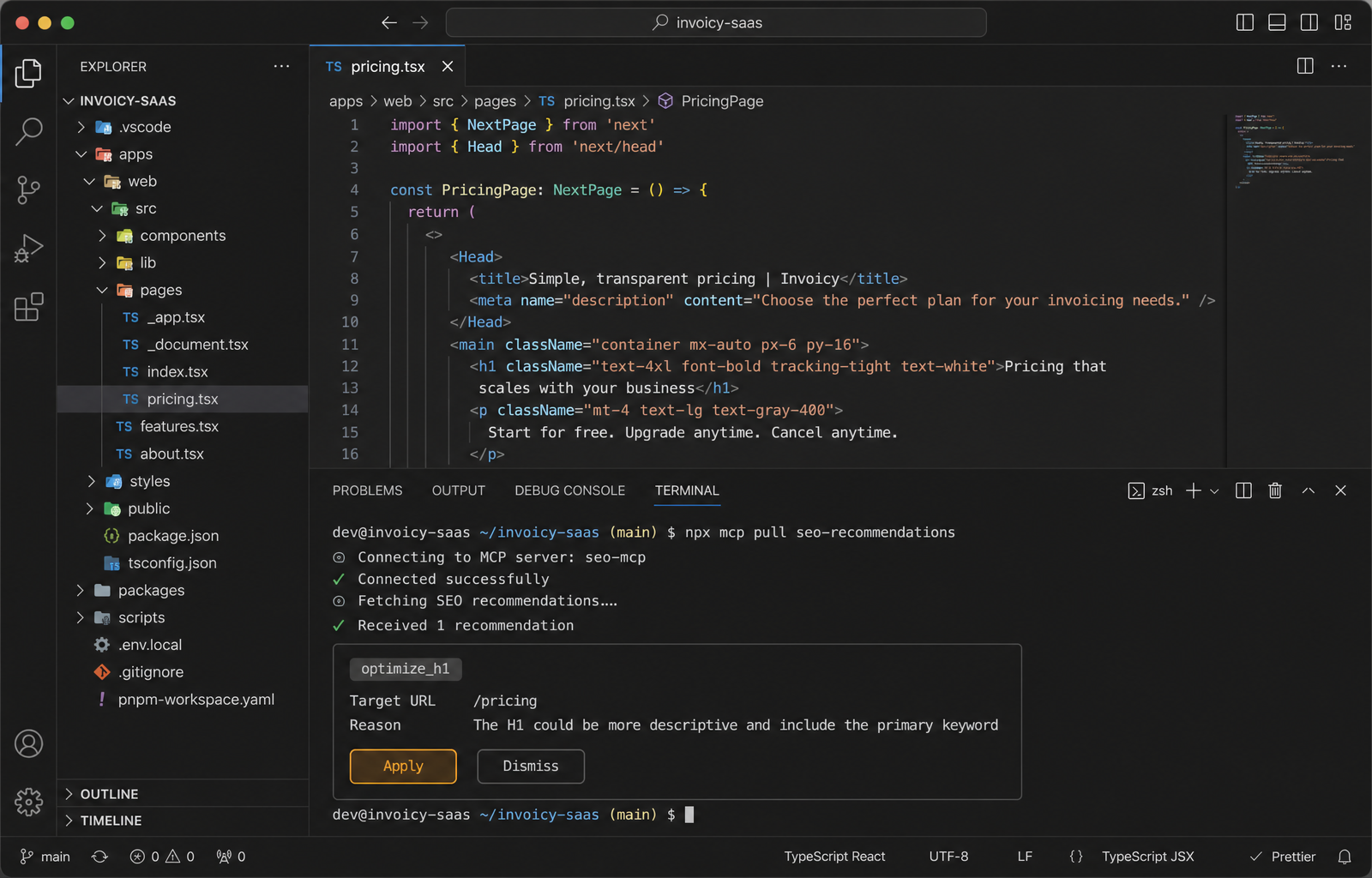
Pages start ranking. The rest of your week stays yours.
Two weeks after the agent's first audit, the pages it touched start picking up clicks. The ones it left alone keep doing what they were doing. That is the bar we hold every recommendation to. Instead of comparing your stack to another AI SEO tool, you compare your Search Console chart from before to after.
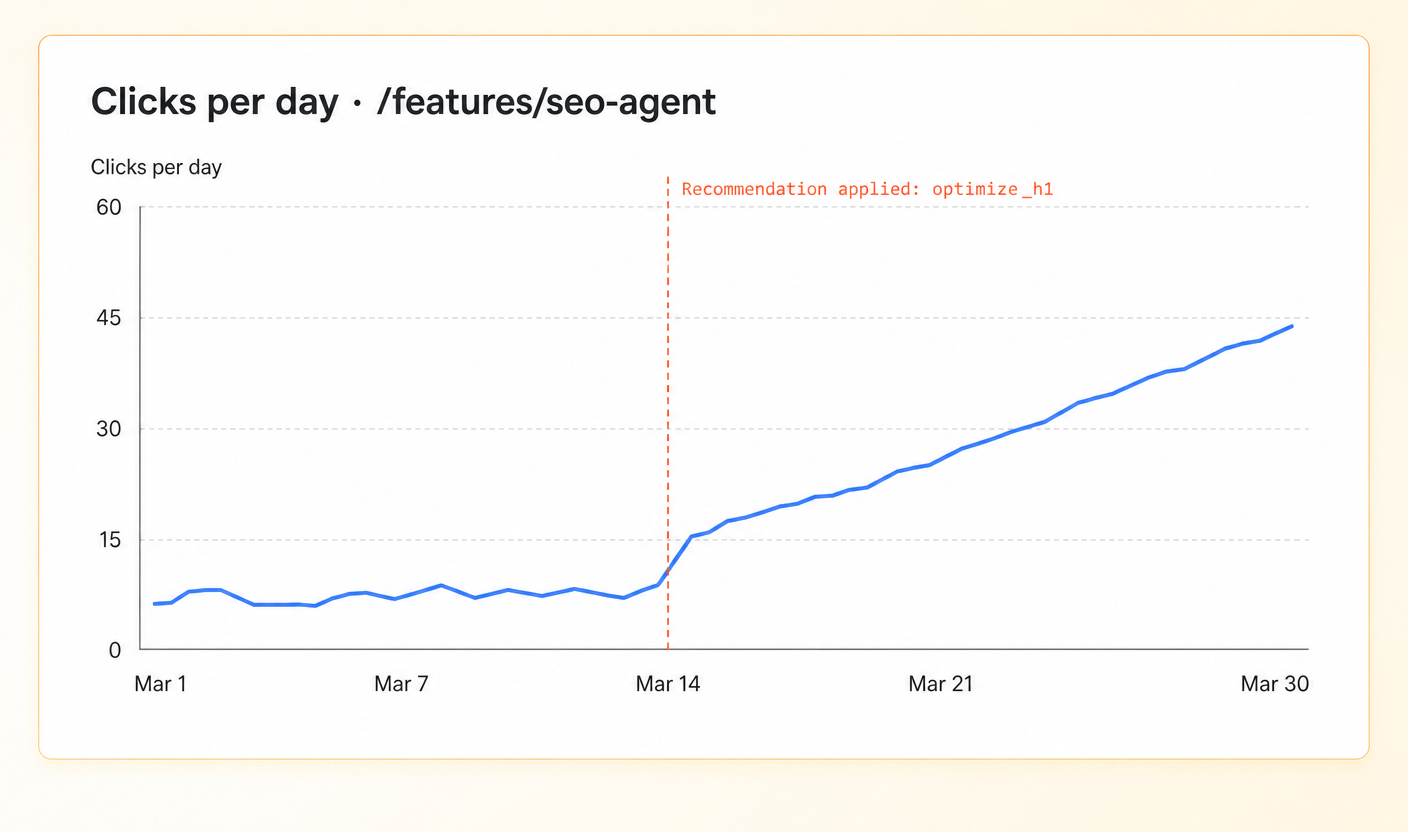
The audit runs on a schedule. You just pull the results.
Most SEO work fails because nobody opens the dashboard. So we took the dashboard out of your daily loop. The agent audits your pages on a schedule in the background, with no command to remember and no tab to open. When you start your day in the IDE, you pull the latest recommendations through MCP, hand the ones worth shipping to your coding agent, and get back to building. Same five minutes that pay off month after month.
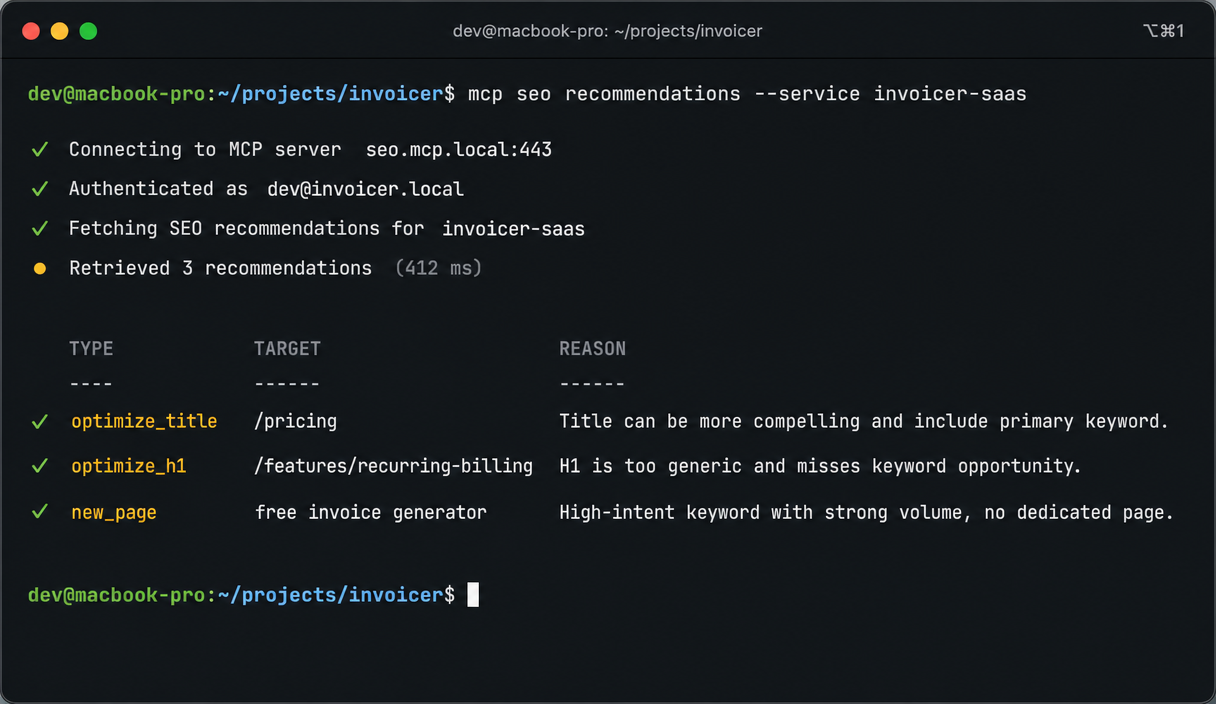
Pull the day's recommendations into your editor.
The audit already ran on its schedule, so the recommendations are waiting when you open your IDE. Pull them through MCP without switching to a dashboard, read the reason and the proposed change inline, and mark each one applied or dismissed from your editor. The ones you apply ship with a coding-agent prompt, so your own agent makes the change and you review the diff.
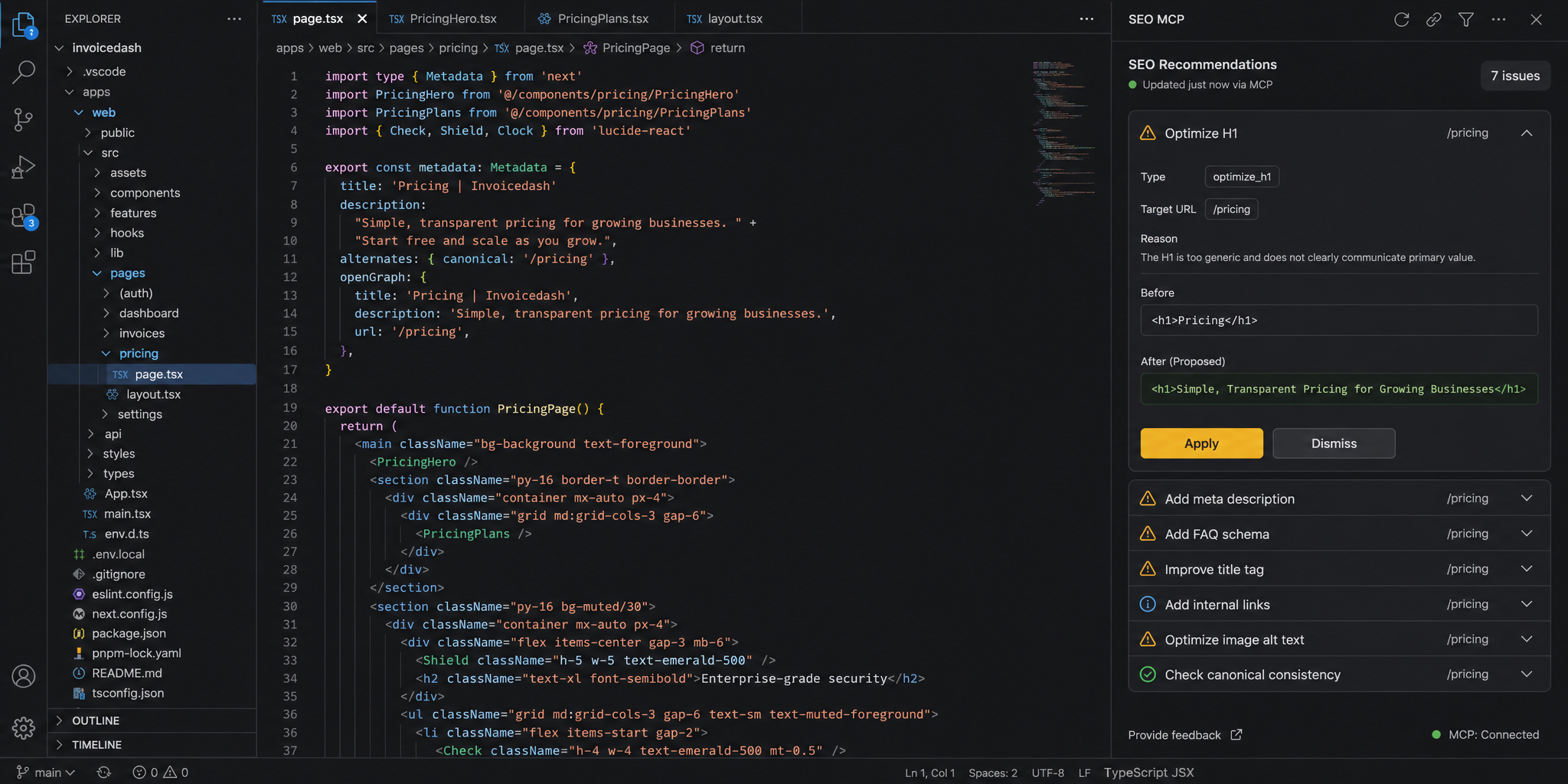
Already using Cursor or Claude Code? Connect in 30 seconds.
Keyword research that finds the few worth ranking for.
Before the agent recommends a single page change, it does the keyword research a founder never gets around to. It seeds from your product context, mines the keywords your competitors already rank for, and pulls live demand: volume, difficulty, cost per click, and search intent. Then it scores every keyword by real opportunity and assigns a priority, so you target the handful that matter and ignore the thousands you cannot win.
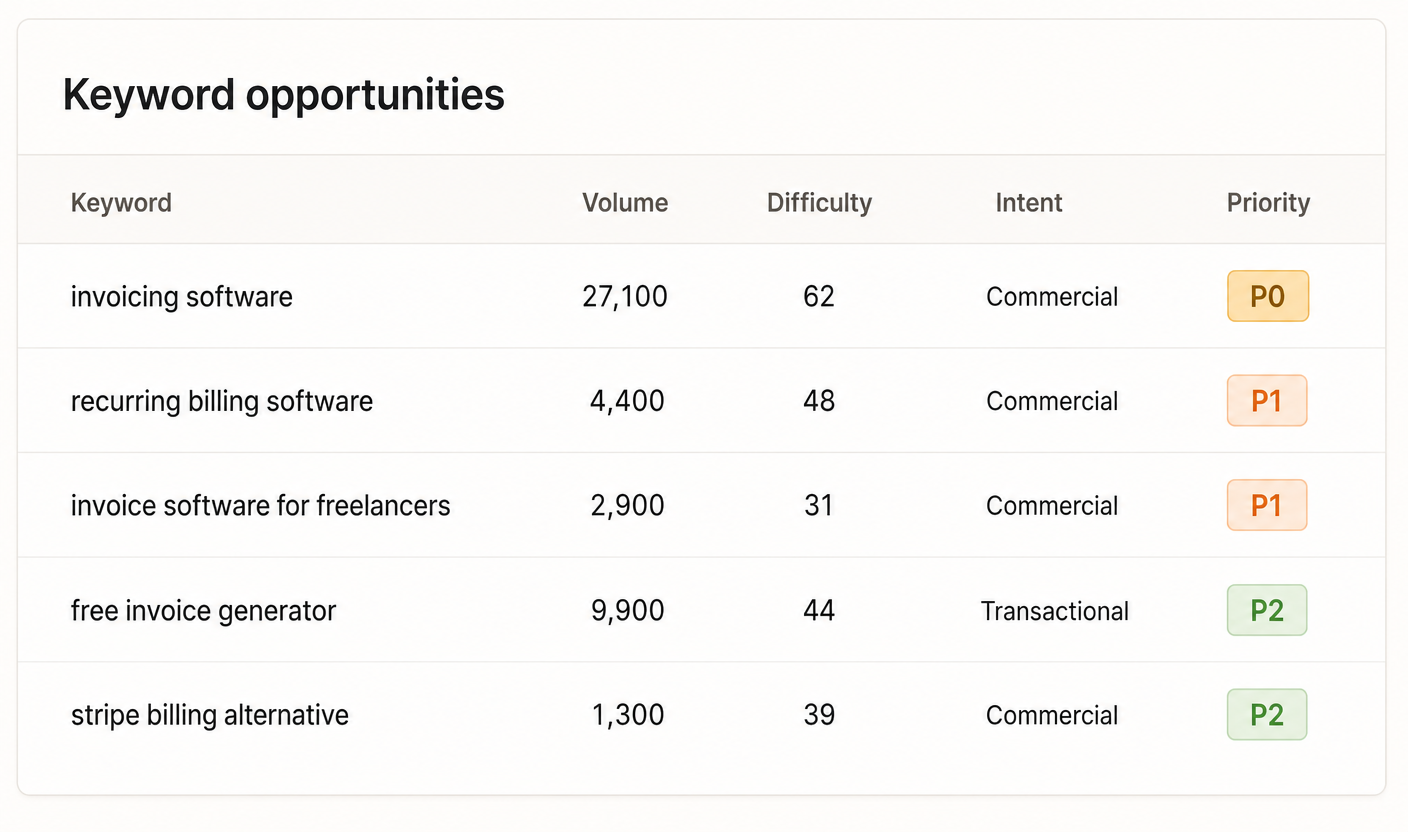
Mined from competitors
The agent seeds from your product, then mines the keywords your competitors already rank for. Every candidate arrives with live volume, difficulty, and commercial intent from real search data, so this is an AI SEO tool grounded in demand rather than a brainstorm.
Scored by opportunity
Each keyword gets an opportunity score that weighs demand against how winnable it is for a site your size, your current ranking gap, and intent. The agent drops broad platform terms and suspicious vanity volumes, so the list stays short and honest.
Mapped to a page
Survivors are bound to a page as a primary or supporting keyword, or flagged as a gap that becomes a new_page recommendation. Your research never sits in a spreadsheet you forget to open.
Specific page-level changes with the prompts your coding agent applies.
Every recommendation is typed, attached to a specific URL, and ships with a copy-pasteable coding-agent prompt. Three real examples, in the same shape the agent writes them.
Win the click before the page loads.
Title and meta description rewrites are the cheapest SEO win in the catalog. The agent reads your live Search Console click-through rate, compares against competitors ranking for the same query, and rewrites the title so a buying-intent searcher actually clicks yours. Each rewrite ships with a before-and-after character count, because most title tags fail by being one phrase too long.
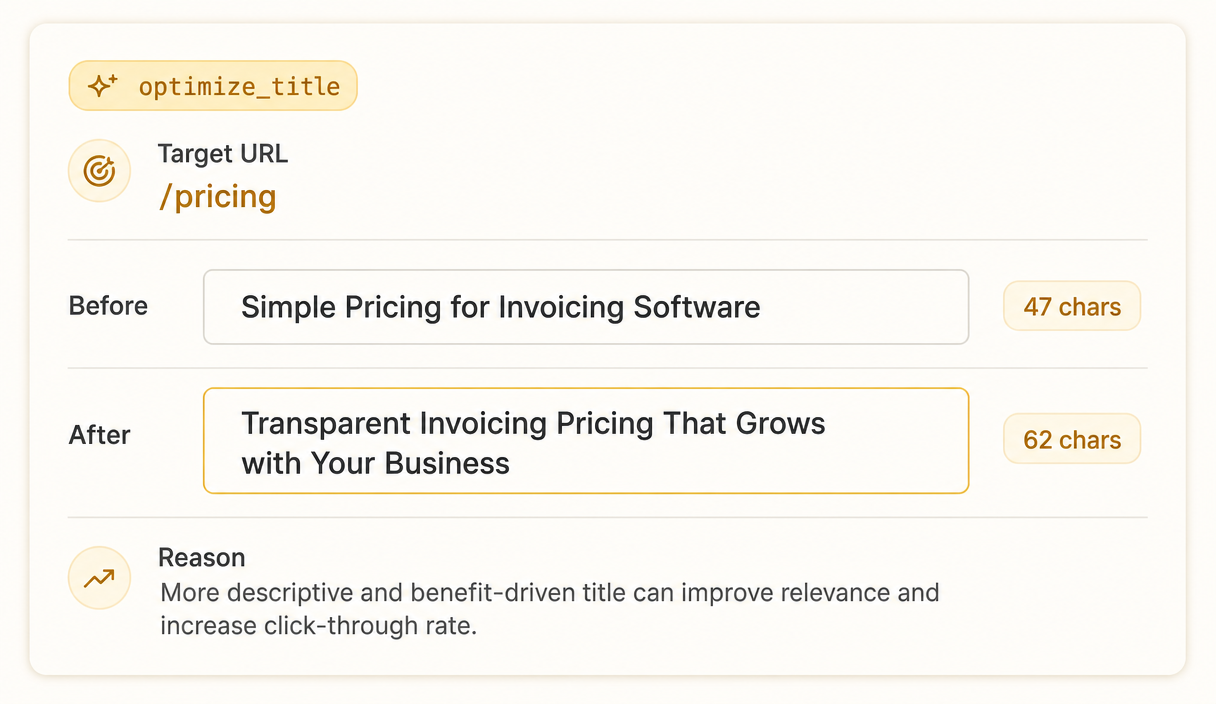
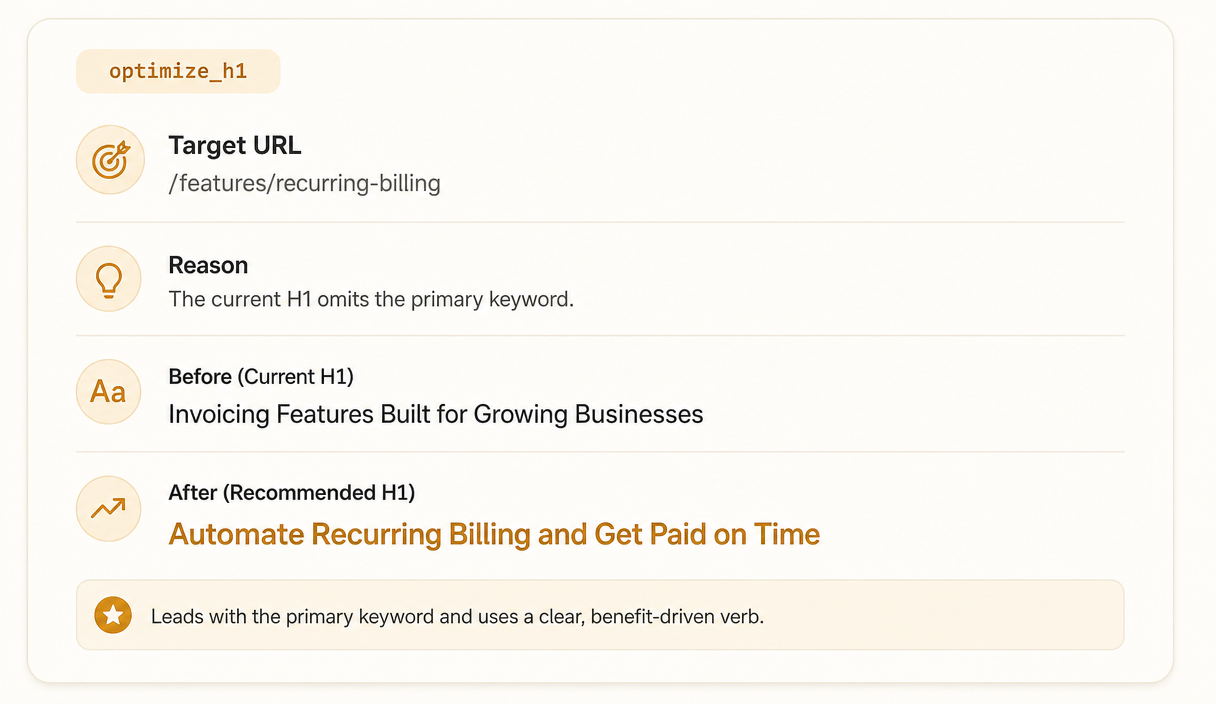
Make sure search intent and your H1 match.
An H1 that does not contain the primary keyword in the first few words is the most common silent ranking drag. The agent diagnoses the intent of the query, the intent of your current H1, and rewrites only when the two are misaligned. It will not rewrite an H1 that is already doing its job, even if you ask.
Cover the topic Google expects without rewriting your voice.
When your page covers half the topic, the recommendation is not "write more". It is a specific outline of which sections to add, which to merge, and which to remove. The agent leaves your voice alone and only proposes the structural changes that move the ranking. You can apply the outline in your IDE the same way you accept any pull request.
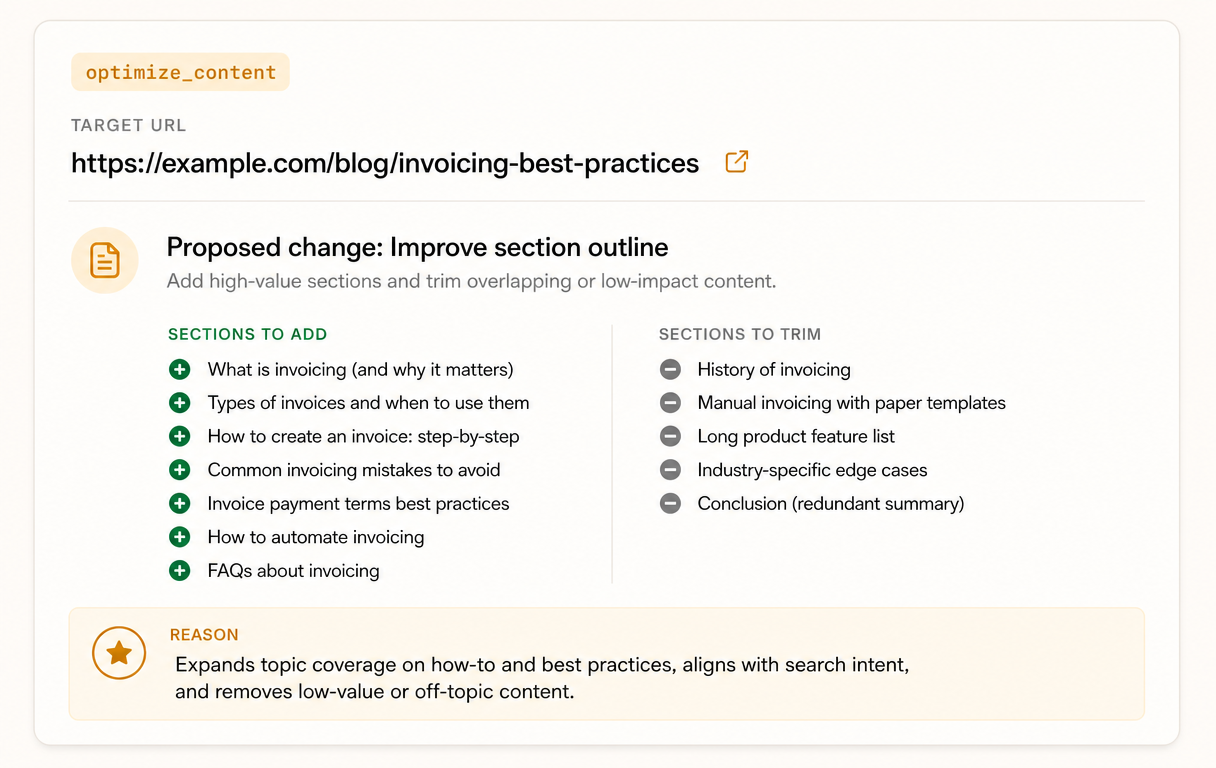
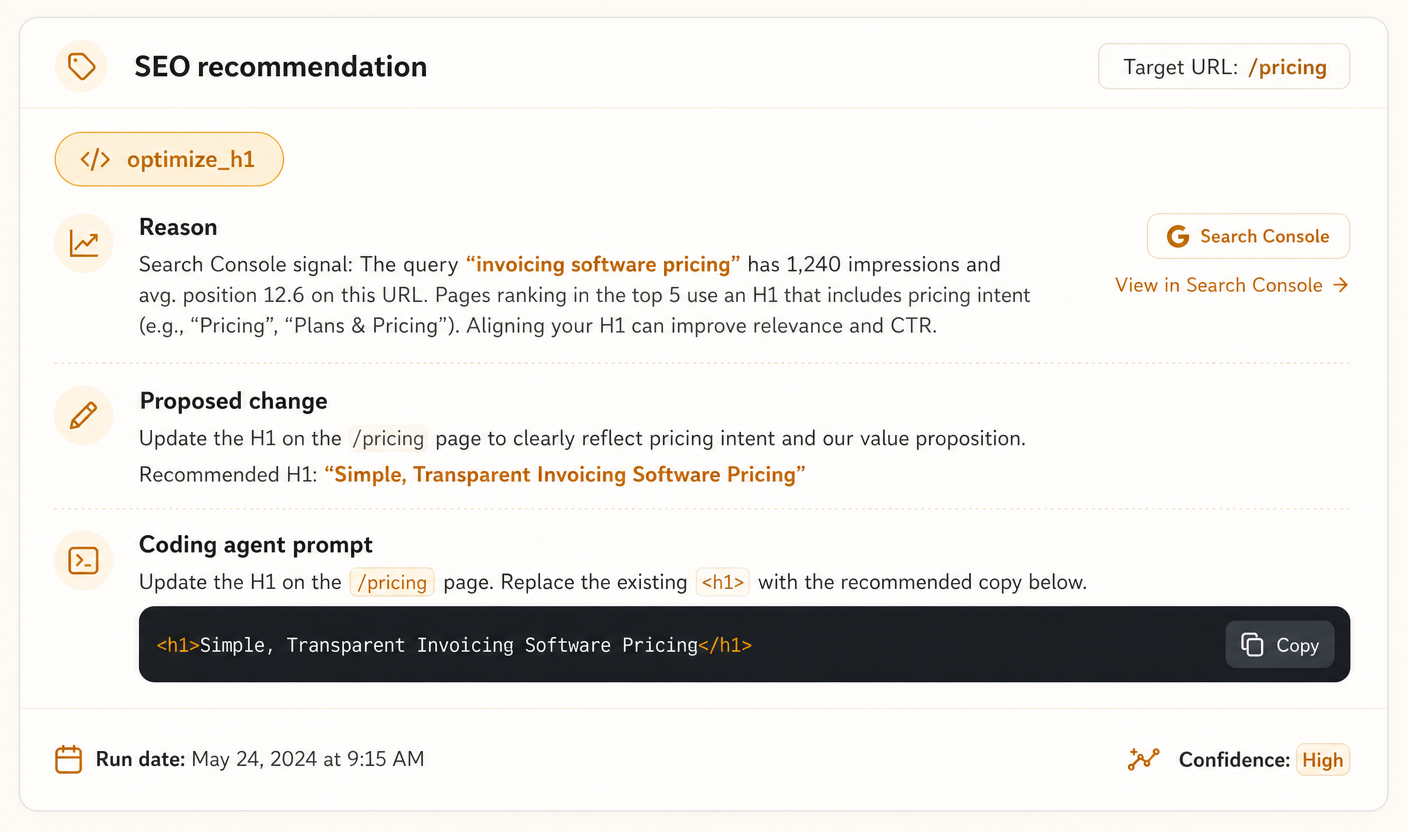
One recommendation, exactly as the agent writes it.
Here is a single recommendation for a fictional invoicing SaaS, rendered in the same shape you would see in your dashboard. A typed change, the URL it targets, the real signal behind it, the proposed edit, and the coding-agent prompt your own agent runs to ship it.
See what the agent finds on your page.
Every recommendation cites a real signal.
We do not recommend a page change without something grounding it. The agent reads three independent signals before writing a single line. If a signal is missing for a page, the agent says so and skips, instead of guessing.
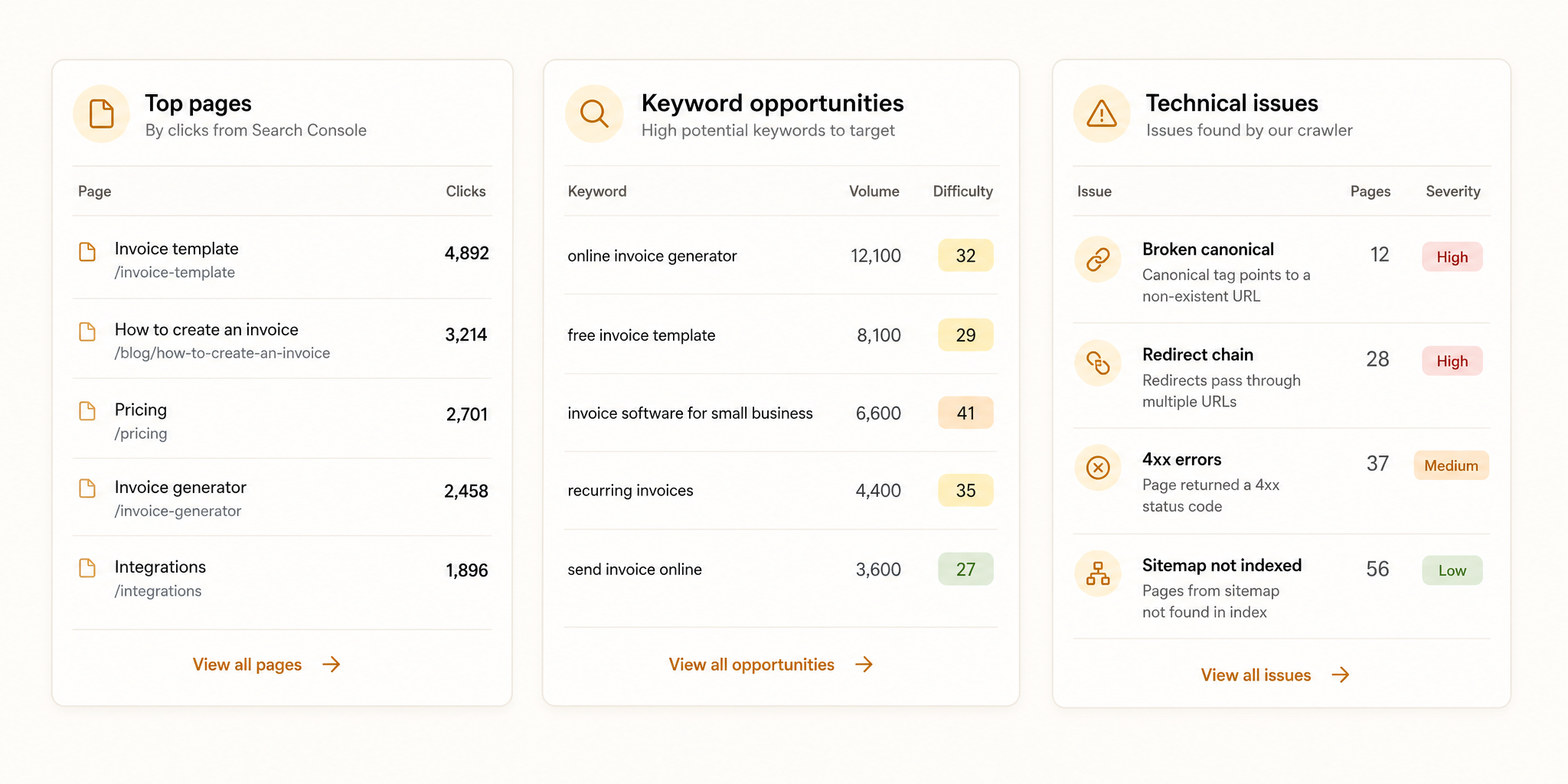
What's already winning
Your Search Console clicks, impressions, click-through rates, and average positions, refreshed daily. The agent uses what you are already ranking for as the baseline for every measurement, so it never recommends a change that walks back a working page.
What could win next
The opportunities from your keyword research, the terms with real demand you do not yet rank for. The agent only proposes a new target once a keyword has cleared the opportunity bar, so nothing speculative reaches your queue.
What's broken right now
Our own crawler reads your sitemap, parses canonical tags, follows redirect chains, and flags noindex responses. Technical issues come up as a separate recommendation type so they do not get buried under content rewrites.
Your sitemap stays submitted to Google. You never open the dashboard.
Connect Google Search Console once and the agent takes over a chore most founders forget. Every week it reads the sitemaps your robots.txt already points to, and when one is new or has changed, it submits it to Search Console for you. Ship a new page from a recommendation and Google gets told to crawl it without you logging in anywhere. It tells Google where your pages are; it never forces them into the index, because that call is Google's.
Discovered from robots.txt
The agent reads the sitemaps your robots.txt already lists. Nothing to paste, no path to configure, no submit step to remember.
Submitted weekly, automatically
When a sitemap is new or has changed, it goes to Search Console on the weekly run, so the pages you just shipped get found faster.
Read-only status you can trust
See last-read, pending, and healthy states per sitemap at a glance. There is no submit button by design, because there is nothing left for you to do.
SEO automation in four steps. The agent runs three of them on its own.
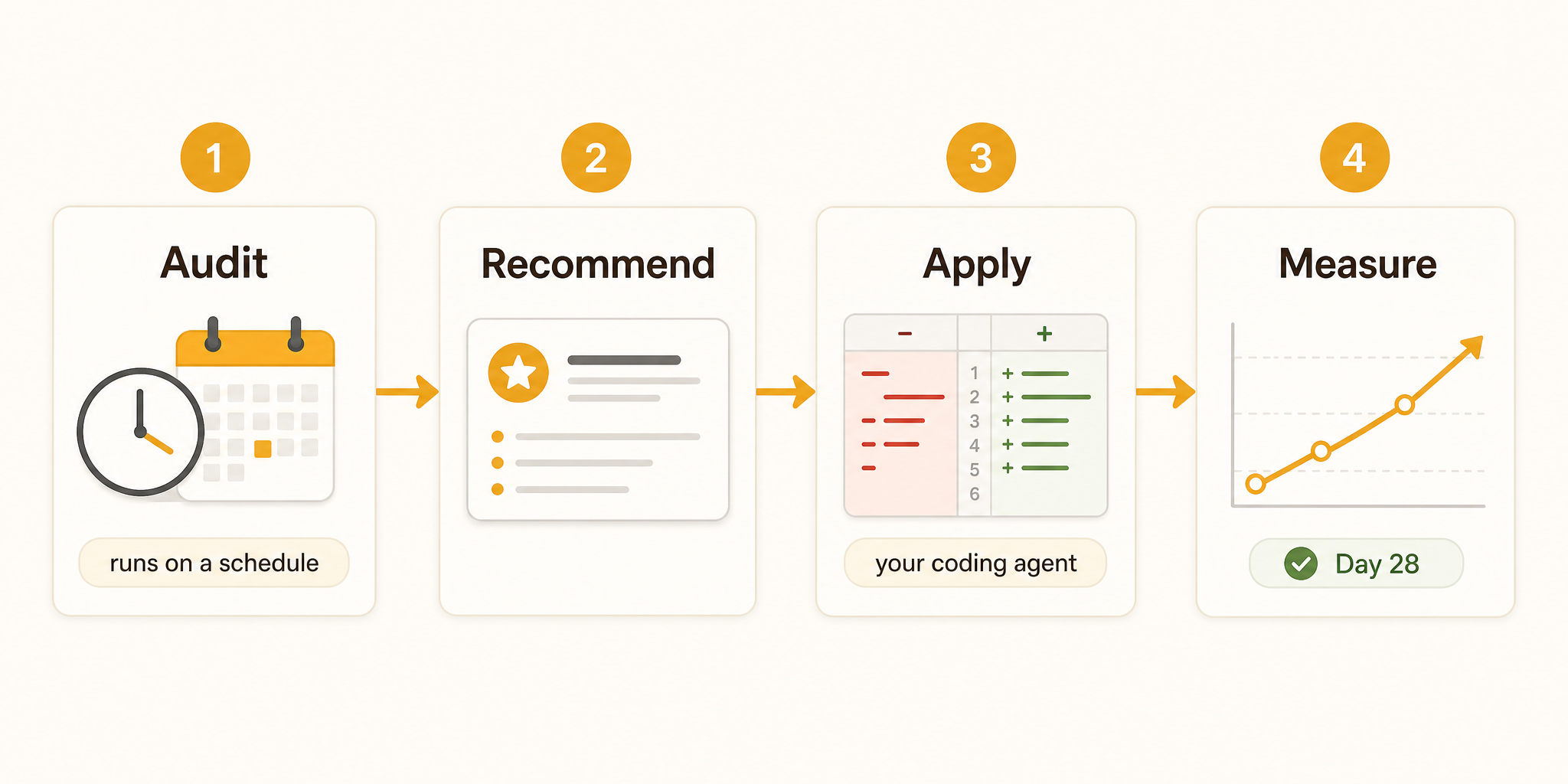
The agent audits on a schedule. You do nothing.
On a recurring schedule, the agent crawls your pages, pulls your Search Console data, and runs the keyword research, then audits every page against all three. No command to remember; the work happens in the background while you build.
Typed recommendations land in your queue.
Each recommendation has a type, a target URL, a reason citing a real signal, and a proposed change. Nothing vague, nothing speculative. If the agent has nothing high-confidence to suggest for a page, it skips it.
You pull it in, your coding agent ships it.
Pull the recommendation through MCP, hand the included prompt to Cursor or Claude Code, review the diff, and ship. VibeCom never touches your code; your own agent makes every change, the same way every other change you make does.
We re-check Search Console 28 days later, automatically.
This is the step most SEO tools skip. Twenty-eight days after a recommendation is applied, the agent reads your Search Console clicks, impressions, and average position for the affected page. It compares against the baseline. If the change moved the needle, the recommendation stays applied. If it did not, the agent writes a follow-up with a different angle. You never have to check the same page twice yourself.
Every kind of work the agent will do for you.
Make your existing pages rank better
The four optimize types, title, meta description, H1, and content, cover the pages you already published. Each is the cheapest possible change with the highest ranking impact. The agent prefers these over creating new pages, because a page that already exists already has authority signals.
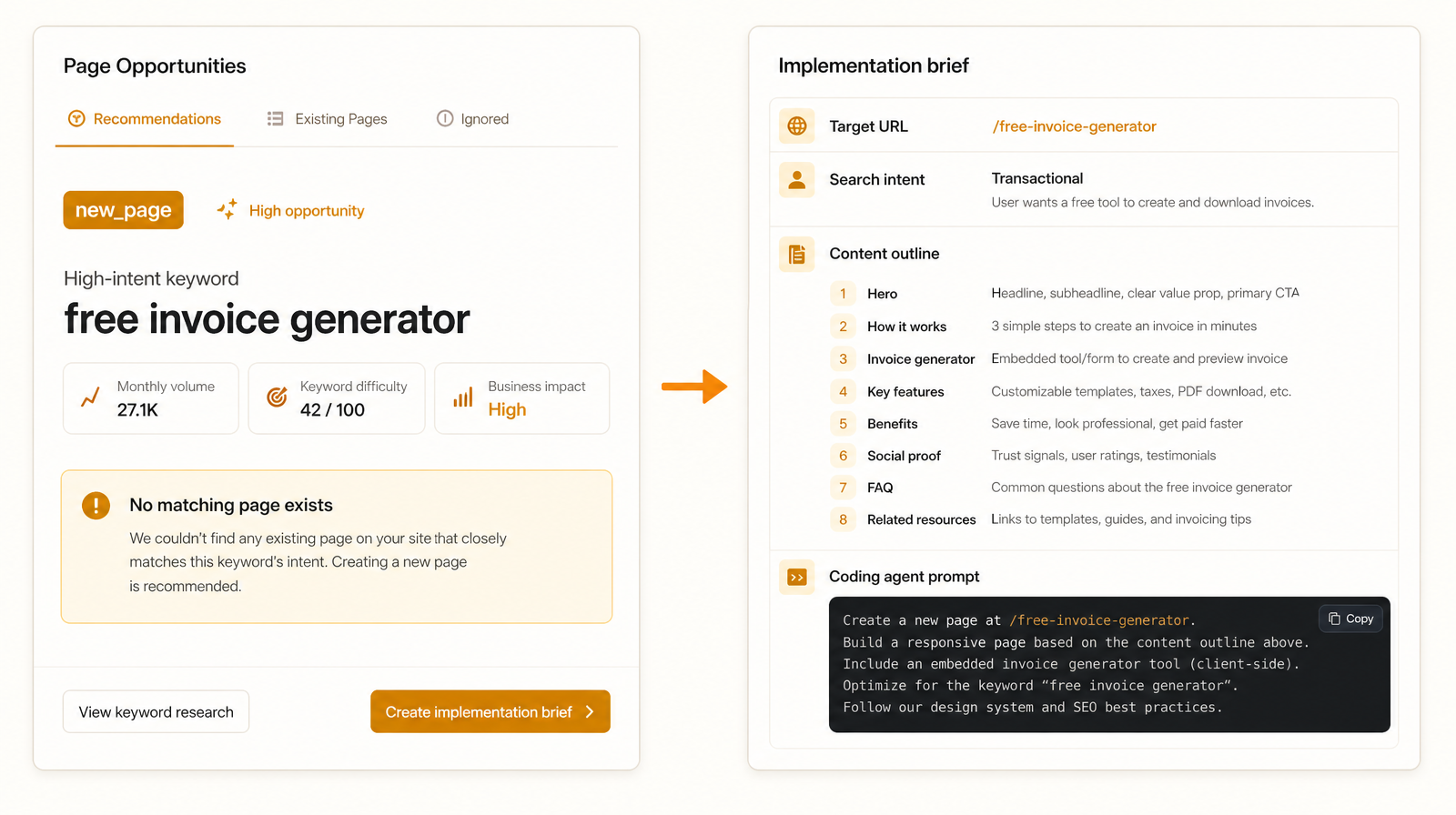
Get a new page when one doesn't exist
When a high-intent keyword has no matching page, the agent writes a new_page recommendation with a full implementation brief: the target URL, the search intent to satisfy, the outline to cover, and a coding-agent prompt that builds the page in your repo. This is how programmatic SEO should work for a founder. Every new page traces back to a real keyword gap, and you ship it through your own codebase the same way you ship a feature.
Keep one keyword on one page, on purpose
The agent runs a strict keyword-to-page map: one primary keyword owns one canonical page, and related secondary keywords support that same page instead of spawning competitors for it. The map is enforced in the database, so the system cannot recommend two of your pages to fight over the same primary term. When it finds two pages already competing, it writes a rebind recommendation and moves the keyword to the page that should rank. This is the fix for silent keyword cannibalization, the single most common reason founder-built SaaS sites underperform.
Fix the technical issues the crawler finds
Broken canonicals, accidental noindex headers, redirect chains the crawler had to bounce through. The technical recommendation type surfaces these as their own kind of work so they do not get lost under content rewrites. The agent tells you what is wrong and which file to edit, but it does not auto-apply technical changes. These are the ones you want to land deliberately.

"Founder-grade SEO without the spreadsheet tax."
Why we built an AI SEO tool that ships fixes, not reports.
Most SEO tools were built for agencies. Five seats, a content calendar, a dashboard somebody opens every morning. None of that is the life of a solo technical founder. We open the IDE, we ship features, and we keep meaning to look at Search Console. The dashboard tab loses.
Real SEO automation is not generating more keyword spreadsheets. It is shipping the page change and watching whether it moved the needle. The agent should do its homework on a schedule against your real signal data, then deliver the recommendations where you already work, so you can apply them in the same session you would have written a feature in. This is what we mean by vibe marketing. The work that lands where you already build, not in a separate tab you forget to open.
The 28-day re-evaluation is not a feature we are proud of shipping. It is the standard. An agent that recommends and forgets is a research tool. We wanted something more honest. So every applied recommendation gets graded against your Search Console data four weeks later, and if it did not work, we say so and write a different one. That is the loop. That is the whole point.
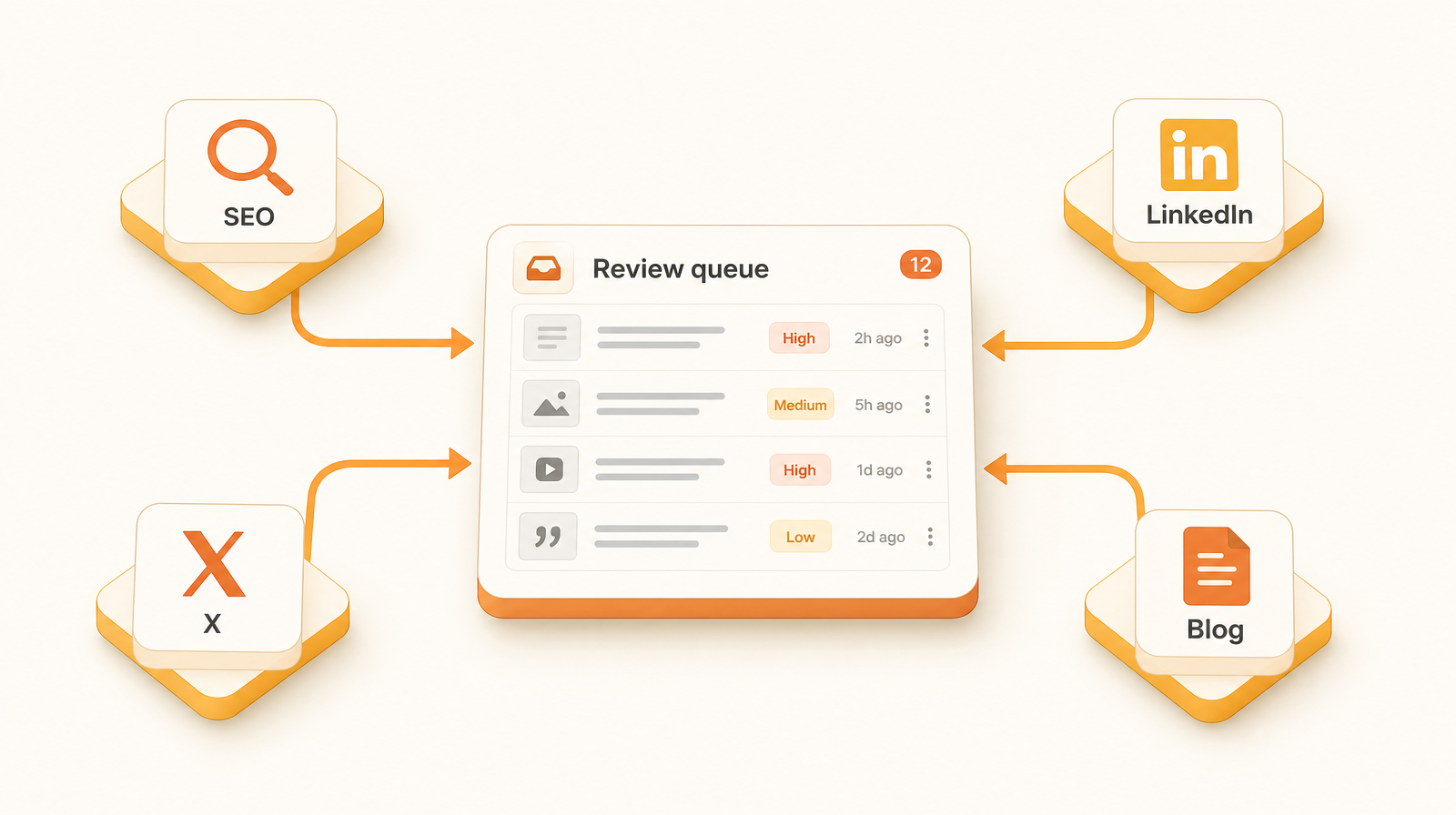
SEO is one slice of a larger vibe marketing platform.
The same agent that audits your pages also drafts your social posts, monitors your competitors, and pushes approved content to the channels you connect. SEO recommendations land in the same morning review queue as everything else, so the daily five-minute check covers your whole marketing surface, not just one slice of it.
SEO for solo technical founders building SaaS.
The SEO agent is built for one user: the solo technical founder who ships the product, runs the marketing, and never gets around to SEO. It needs context on your product, your pages, and your codebase, applied with the same care you give the product itself. Generic SEO tools were never designed to work that way.
It runs on real founder products every week, and every rule it follows traces back to a real mistake on a real page. If you are a solo technical founder shipping a SaaS, the workflow fits the way you already build, not the way an agency would have you work.
Common questions before you connect
Start the loop you actually maintain.
Connect via MCP from your IDE. Audits run on a schedule; you pull the recommendations and your coding agent ships the fixes. Five minutes a day, every day you ship.